Trapped in the Robot Control Room
Your brain is like a prisoner in a windowless control room of a giant robot, receiving inputs and sending outputs without any direct access to the outside world. It must learn to interpret signals and coordinate actions without labels, highlighting that brains are not blank slates but have built-in competences.
THE IDEA
[23. TRAPPED IN THE ROBOT CONTROL ROOM]
Robots have no wonder tissue in them (by definition, in effect), so they provide an antiseptically clean platform for thought experiments, such as this one:
You wake up one morning to find yourself in an unfamiliar bed in a strange windowless room; two of its walls are covered with tiny blinking lights of various colors, and the other two are covered with thousands of pushbuttons. There are numbers on the lights and buttons, but no labels. Somebody has left you a note on the bedside table.
Good morning! You were drugged and kidnapped while you slept and brought here to your new home. There is food in the fridge and a bathroom in the corner, so your local bodily needs will all be met. You are imprisoned in the control room of a giant robot. Each light, when it turns on, provides rich and relevant information about the robot’s circumstances; these lights are all outputs from highly sophisticated neural net analyzers of the raw inputs streaming from the robot’s high-definition video eyes and microphone ears, touch sensors, and olfactory sensors. The buttons initiate robotic actions, all coordinated and ready to execute.
The robot inhabits a dangerous world, with many risks and opportunities. Its future lies in your hands, and so, of course, your own future as well depends on how successful you are in piloting your robot through the world. If it is destroyed, the electricity in this room will go out, there will be no more food in the fridge, and you will die. Good luck!
This is a nasty predicament. With your heart in your mouth, you start experimenting, pushing buttons to see what happens. You push the yellow button numbered 4328 and notice that when you do, the blue light numbered 496 flickers out. Were you scratching the robot’s itch or closing the robot’s eyes or maybe “eating” something, thereby satisfying the robot’s pressing metabolic needs? You push button 4328 a second time, and a different scattering of lights turn on. What has changed in the world? What does this mean? This is tantalizing because you have been told that there is a tremendous amount of information in those lights, but which light signals which information, and which button orders which robotic action?
If only the lights and buttons were labeled! Then—if the labels were in a language you understood—you might be able to solve the problem. Or if only there were a window in the room that you could open, so you could look out and see what moved when you pushed a button! Does the robot have arms and legs? With a window, you could try to correlate events in the outside world with the flashing lights on the walls. Without a window, you have all this information ready at hand, but no way to interpret it. You have hundreds of robotic actions to set into motion, but no way of figuring out what effects they can achieve in the world.
It appears that you are in an impossible situation. However clever and imaginative you are, you won’t be able to figure out the meanings of the events occurring on the walls of your room, given all the data at your disposal. But if you can’t solve this problem, we have something approaching a paradox, because your predicament here is none other than your brain’s predicament! It is trapped in a windowless room—your skull—with millions of input lines positively humming with information about the external world and your bodily circumstances, and millions of output lines poised to stimulate muscles into contraction or relaxation. And your brain can’t open a window in your skull and look out to see what’s happening that might be causing the patterns of signals streaming into your visual cortex. (What good would such a window be for your brain in any case? Unlike you, it has no eyes in addition to the eyes whose signals it is receiving and trying to interpret, and no prior memories of what things in the world look like.)
Perhaps, you may think, the brain’s task is made easier by the fact that the pattern of excitation—the blinking lights—on the surface of the visual cortex when you’re looking at a duck, for example, is actually shaped like a duck![1] This would be fine, if we could suppose your brain had learned, as you have, what a duck looks like, but how is your brain ever going to learn that?
How can your brain learn anything if it first has to “decode” all its signals? And decode those signals into what? Turkish? Printed labels in Turkish mean nothing to you unless you understand Turkish. Does your brain have to understand a language before it can derive any value from its input? As we have already seen, this idea, that brains come equipped with an internal language that they never have to learn—Mentalese, or the Language of Thought (Fodor, 1975, 2008)—is tantalizing. It seems to be a step in the right direction, but until the details are provided about how it works, and how it evolved in the first place, declaring that there is such a language of thought is just renaming the problem without solving it. We know that the brain solves the problem somehow; our brains do manage quite reliably to find the appropriate outputs to cope with the predicaments and opportunities the input information heralds. And we know that the brain’s solution—whatever it is—can’t be just like a language (like English or Turkish) since it isn’t acquired in childhood the way we acquire our native tongues. Would it be more like a written language (with memories duly inscribed in the brain’s archives) or a purely spoken language? Does it have a vocabulary of thousands or millions or billions of “words”? Does word order matter? Is there a grammar? Can one part of the brain misunderstand another part’s message?
If the language-of-thought hypothesis postulates a homunculus in the control room who understands the language (like you in the giant robot, reading the labels on the lights and buttons), it merely postpones the task of figuring out how learning and comprehension can be composed out of machinery consisting of uncomprehending parts. And if it doesn’t postulate a homunculus who decodes the messages, then the system, whatever it is, isn’t much like a language after all. And since nobody has yet come up with the details of how such a language of thought would work, or get installed during development and experience, it is probably better not to kid ourselves, not to lull ourselves into thinking we are making progress when we probably aren’t.
This intuition pump shows us that your brain is importantly not in the same predicament you would be in, trapped in the control room. Its task is—must be—partly solved in advance by the way some inputs are “wired up” to some outputs so that there is some leverage in the brain with which to learn and refine further appropriate relationships. This is another way of dramatizing the widely recognized claim that our brains are not “blank slates” at birth (Pinker, 2002), but are already designed by natural selection to embody various preferences, anticipations, and associations. And as long as some of the appropriate connections are built in, they don’t have to be labeled.
Before there can be comprehension, there has to be competence without comprehension. This is nature’s way. Bacteria have all sorts of remarkable competences that they need not understand at all; their competences serve them well, but they themselves are clueless. Trees have competences whose exercise provides benefits to them, but they don’t need to know why. The process of natural selection itself is famously competent, a generator of designs of outstanding ingenuity and efficacy, without a shred of comprehension.
Comprehension of the kind we human adults enjoy is a very recent phenomenon on the evolutionary scene, and it has to be composed of structures whose competence is accompanied by, enabled by, a minimal sort of semi-comprehension, or pseudo-comprehension—the kind of (hemi-semi-demi-)comprehension enjoyed by fish or worms. These structures are designed to behave appropriately most of the time, without having to know why their behavior is appropriate.
The alternative, putting a full-fledged Comprehender in the control room, confronted by all the inputs and outputs, is a guaranteed dead end. Why? Because if this power of comprehension is inexplicable, you have installed wonder tissue, a miracle, at the base of your theory, and if it is explicable—in terms of processes and activities and powers that do not themselves have the power of comprehension—you have wasted your turn and are right back at the beginning with those of us who are trying to explain how comprehension grows out of competence.
[1] Yes, the patterns of excitation in the occipital (visual) cortex (and other regions) actually do take on the (distorted) shapes of the objects in the world in front of your eyes, but is anything in your brain looking at those shapes? Maybe something is sorta looking at those shapes. This is an idea to approach with caution.
[IV. AN INTERLUDE ABOUT COMPUTERS]
Time out. As you have probably noticed, I have mentioned computers quite a bit already, and there is much more computer lore to come in the pages ahead. Computers are without a doubt the most potent thinking tools we have, not just because they take the drudgery out of many intellectual tasks, but also because many of the concepts computer scientists have invented are excellent thinking tools in their own right. We are all swimming in the flood of computer jargon these days—software and hardware, bandwidth and gigahertz—and surely most of you have absorbed fairly accurate impressions about what the new buzzwords mean. I have discovered, however, that although my students nod knowingly when I deploy such terms in my classes, their comprehension is uneven, and they sometimes confound me by arriving at weird misunderstandings of what I was trying to convey to them. So I am going to teach you how to write programs for the world’s simplest computer.
If you take the time and effort now to master a few basic skills, it will pay off handsomely in deepening your understanding of what follows. (And if you are already a seasoned computer professional, you might find some of my ways of explaining the issues useful when talking to nonexperts, or you can skip ahead.) I have test-flown what follows on hundreds of computer-phobic undergraduates, with happy results: even those who would rather memorize a page of the phone book than solve a puzzle acknowledge the pleasure, the tingle of satisfaction, in making this idiotically simple computer do its stuff. And when you complete the exercise, you will have been initiated into the Seven Secrets of Computer Power.
[24. THE SEVEN SECRETS OF COMPUTER POWER REVEALED]
Computers have powers that in earlier centuries would have seemed miraculous—“real magic”—but although many computer programs are dauntingly complicated, all of them are composed of steps that are completely explainable in very simple terms. There is no room for mysteries in what computers do. That very fact is part of the value of computers as thinking tools, and explaining—in outline—how this works is philosophically interesting in its own right. How computers do their “magic” is well worth understanding at an elementary level. This chapter provides that demystification.
We start by considering what is probably the simplest imaginable computer, a register machine, to see just what its powers are and why. We will then go on to see how a Turing machine, and a Von Neumann machine (such as your laptop) are just like register machines, only more efficient. (Anything your laptop can do, a register machine can do, but don’t hold your breath; it might take centuries.) Then we can understand how other computer “architectures” could further multiply the speed and capacity of our basic machine, the register machine. The architecture of the human brain is, of course, one of the most interesting and important architectures to consider.
Hang on. Am I claiming that your brain is just a gigantic computer? No—not yet in any case. I am pointing out that if your brain is a gigantic computer, then there will be a way of understanding all its activities with no residual mysteries—if only we can find it. Our method will be reverse engineering: studying a complicated system to uncover how it does what it does. Reverse engineering tells us how the heart executes its duties as a pump and how the lungs gather oxygen and expel carbon dioxide. Neuroscience is the attempt to reverse engineer the brain. We know what brains are for—for anticipating and guiding and remembering and learning—but now we need to figure out how they accomplish all this.
This is a topic of passionate controversy. The novelist Tom Wolfe (2000) pinpointed the tender spot around which the battles rage with the title of his essay “Sorry, But Your Soul Just Died.” If we are to explore this dangerous territory—and not just waste everybody’s time with declamations and denunciations—we need some sharper tools. We need to know what computers can do and how they do it before we can responsibly address the question of whether or not our brains harbor and exploit incomprehensible or miraculous phenomena beyond the reach of all possible computers. The only satisfactory way of demonstrating that your brain isn’t—couldn’t be—a computer would be to show either (1) that some of its “moving parts” engage in sorts of information-handling activities that no computers can engage in, or (2) that the simple activities its parts do engage in cannot be composed, aggregated, orchestrated, computer-fashion, into the mental feats we know and love.
Some experts—not just philosophers, but neuroscientists, psychologists, linguists, and even physicists—have argued that “the computer metaphor” for the human brain/mind is deeply misleading, and, more dramatically, that brains can do things that computers can’t do. Usually, but not always, these criticisms presuppose a very naïve view of what a computer is or must be, and end up proving only the obvious (and irrelevant) truth, that brains can do lots of things that your laptop can’t do (given its meager supply of transducers and effectors, its paltry memory, its speed limit). If we are to evaluate these strong skeptical claims about the powers of computers in general, we need to understand where computer power in general comes from and how it is, or can be, exercised.
The brilliant idea of a register machine was introduced at the dawn of the computer age by the logician Hao Wang (1957), a student of Kurt Gödel’s, by the way, and a philosopher. It is an elegant tool for thinking, and you should have this tool in your own kit. It is not anywhere near as well known as it should be.[1] A register machine is an idealized, imaginary (and perfectly possible) computer that consists of nothing but some (finite number of) registers and a processing unit.
The registers are memory locations, each with a unique address (register 1, register 2, register 3, and so on) and each able to have, as contents, a single integer (0, 1, 2, 3, . . .). You can think of each register as a large box that can contain any number of beans, from 0 to . . . , however large the box is. We usually consider the boxes to be capable of holding any integer as contents, which would require infinitely large boxes, of course. Very large boxes will do for our purposes.
The processing unit is equipped with just three simple competences, three “instructions” it can “follow,” in stepwise, one-at-a-time fashion. Any sequence of these instructions is a program, and each instruction is given a number to identify it. The three instructions are:
End. That is, it can stop or shut itself down.
Increment register n (add 1 to the contents of register n; put a bean in box n) and go to another step, step m.
Decrement register n (subtract 1 from the contents of register n; remove one bean from box n) and go to another step, step m.
The Decrement instruction works just like the Increment instruction, except for a single all-important complication: What should it do if the number in register n is 0? It cannot subtract 1 from this (registers cannot hold negative integers as contents; you can’t take a bean out of an empty box), so, stymied, it must Branch. That is, it must go to some other place in the program to get its next instruction. This requires every Decrement instruction to list the place in the program to go to next if the current register has content 0. So the full definition of Decrement is:
Decrement register n (subtract 1 from the contents of register n) if you can and go to step m OR if you can’t decrement register n, Branch to step p.
Here, then, is our inventory of everything a register machine can do, with handy short names: End, Inc, and Deb (for De crement-or-B ranch).
At first glance, you might not think such a simple machine could do anything very interesting; all it can do is put a bean in the box or take a bean out of the box (if it can find one, and branch to another instruction if it can’t). In fact, however, it can compute anything any computer can compute.
Let’s start with simple addition. Suppose you wanted the register machine to add the contents of one register (let’s say, register 1) to the contents of another register (register 2). So, if register 1 has contents [3] and register 2 has contents [4], we want the program to end up with register 2 having contents [7] since 3 + 4 = 7. Here is a program that will do the job, written in a simple language we can call RAP, for Register Assembly Programing:
program 1: ADD [1,2]

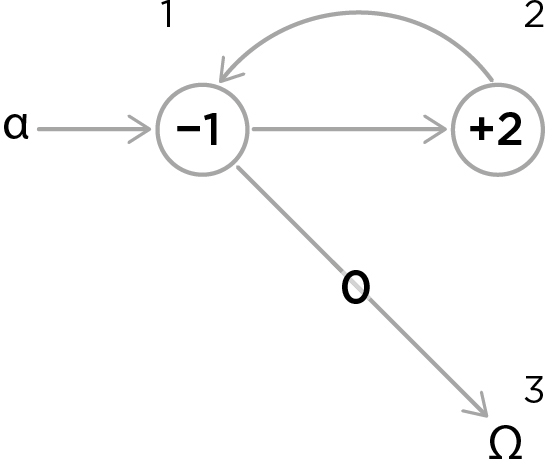
The first two instructions form a simple loop, decrementing register 1 and incrementing register 2, over and over, until register 1 is empty, which the processing unit “notices” and thereupon branches to step 3, which tells it to halt. The processing unit cannot tell what the content of a register is except in the case where the content is 0. In terms of the beans-in-boxes image, you can think of the processing unit as blind, unable to see what is in a register until it is empty, something it can detect by groping. But in spite of the fact that it cannot tell, in general, what the contents of its registers are, if it is given program 1 to run, it will always add the content of register 1 (whatever number is in register 1) to the content of register 2 (whatever number is in register 2) and then stop. (Can you see why this must always work? Go through a few cases to make sure.) Here is a striking way of looking at it: the register machine can add two numbers together perfectly without knowing which numbers it is adding (or what numbers are or what addition is)!
Exercise 1
a. How many steps will it take the register machine to add 2 + 5 and get 7, running program 1 (counting End as a step)?
b. How many steps will it take to add 5 + 2?
(What conclusion do you draw from this?)[2]
There is a nice way to diagram this process, in what is known as a flow graph. Each circle stands for an instruction. The number inside the circle stands for the address of the register to be manipulated (not the content of a register) and “+” stands for Inc and “–” stands for Deb. The program always starts at α, alpha, and stops when it arrives at Ω, omega. The arrows lead to the next instruction. Note that every Deb instruction has two outbound arrows, one for where to go when it can decrement, and one for where to go when it can’t decrement, because the contents of the register is 0 (branching on zero).
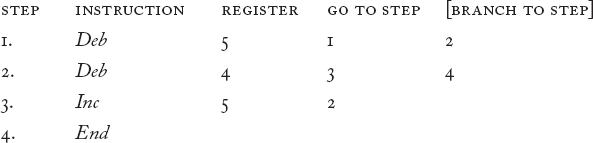
Now let’s write a program that simply moves the contents of one register to another register:
program 2: MOVE [4,5]
Here is the flow graph:
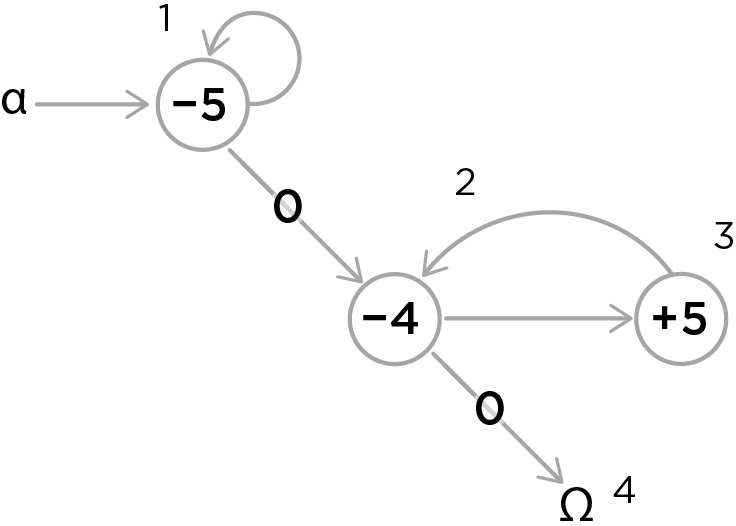
Notice that the first loop in this program cleans out register 5, so that whatever it had as content at the beginning won’t contaminate what is built up in register 5 by the second loop (which is just our addition loop, adding the content of register 4 to the 0 in register 5). This initializing step is known as zeroing out the register, and it is a very useful, standard operation. You will use it constantly to prepare registers for use.
A third simple program copies the content of one register to another register, leaving the original content unchanged. Consider the flow graph and then the program:
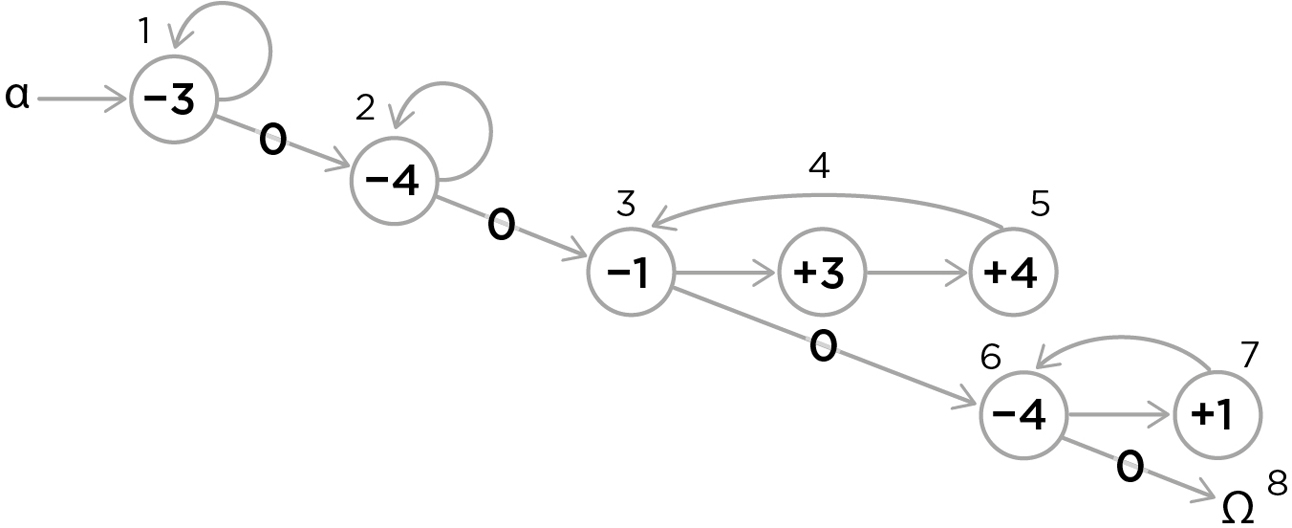
program 3: COPY [1,3]
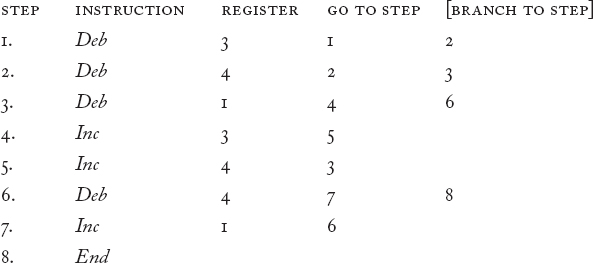
This is certainly a roundabout way of copying, since we do it by first moving the contents of register 1 to register 3 while making a duplicate copy in register 4, and then moving that copy back into register 1. But it works. Always. No matter what the contents of registers 1, 3, and 4 are at the beginning, when the program halts, whatever was in register 1 will still be there and a copy of that content will be in register 3.
If the way this program works isn’t dead obvious to you yet, get out some cups for registers (pencil a number on each cup, its address) and a pile of pennies (or beans) and “hand simulate” the whole process. Put a few pennies in each register and make a note of how many you put in register 1 and register 3. If you follow the program slavishly, when you finish, the number of pennies in register 1 will be the same as it was at first, and the same number will now be in register 3. It is very important that you internalize the basic processes of the register machine, so you don’t have to think hard about them, because we’re going to be exploiting this new talent in what follows. So take a few minutes to become a register machine (the way an actor can become Hamlet).
I find that some of my students lapse into a simple error: they imagine that when they decrement a register, they have to put that penny, the one they just took from register n, in some other register. No. Decremented pennies just go back in the big pile, your “infinite” supply of pennies to use in this simple adding-and-subtracting routine.
With moving, copying, and zeroing out in our kit, we are ready to go back to our addition program and improve it. Program 1 puts the right answer to our addition problem in register 2, but in the process it destroys the original contents of registers 1 and 2. We might want to have a fancier addition program that saves these values for some later use, while putting the answer somewhere else. So let’s consider the task of adding the content of register 1 to the content of register 2, putting the answer in register 3 and leaving the contents of registers 1 and 2 intact.
Here is a flow graph that will accomplish that:
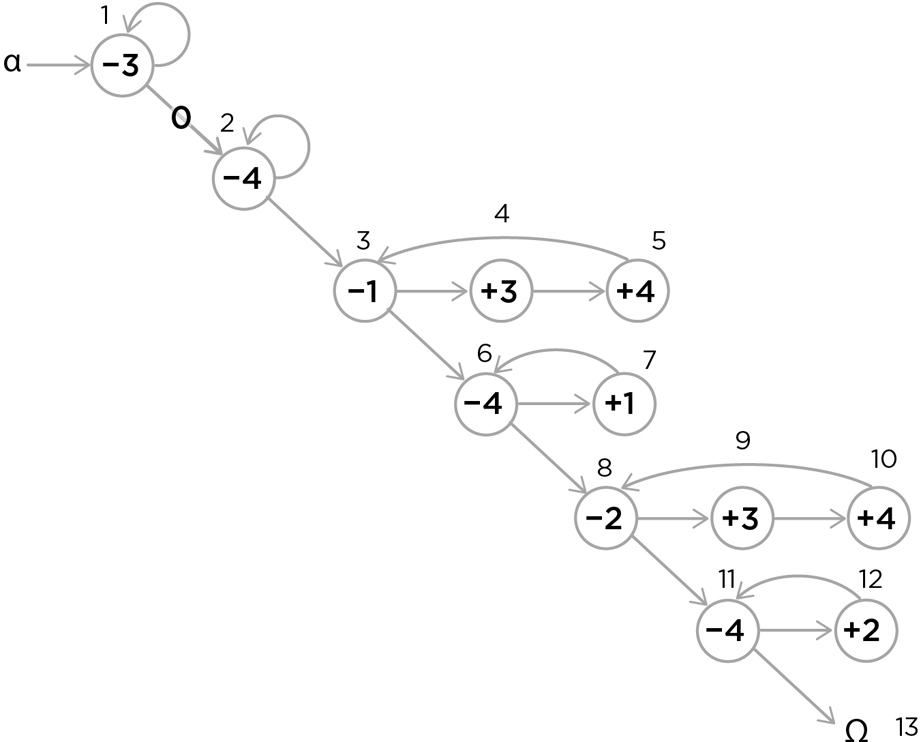
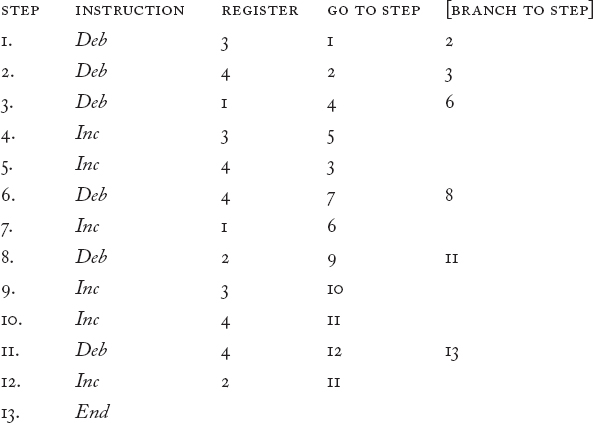
We can analyze the loops, to see what each does. First we zero out the answer register, register 3, and then we zero out a spare register (register 4) to use as a temporary holding tank or buffer. Then we copy the content of register 1 to both registers 3 and 4, and move that content back from the buffer to 1, restoring it (and in the process, zeroing out register 4 for use again as a buffer). Then we repeat this operation using register 2, having the effect of adding the content of register 2 to the content we’d already moved to register 3. When the program halts, buffer 4 is empty again, the answer is in register 3, and the two numbers we added are back in their original places, registers 1 and 2.
This thirteen-step RAP program puts all the information in the flow graph in the form that the processing unit can read:
program 4: Non-destructive ADD [1,2,3]
I am not going to recommend that you simulate this program by hand with the cups and pennies. Life is short, and once you have internalized the basic processes in your imagination, you can now take advantage of a prosthetic device, RodRego, a register machine you can download from http://sites.tufts.edu/rodrego/.
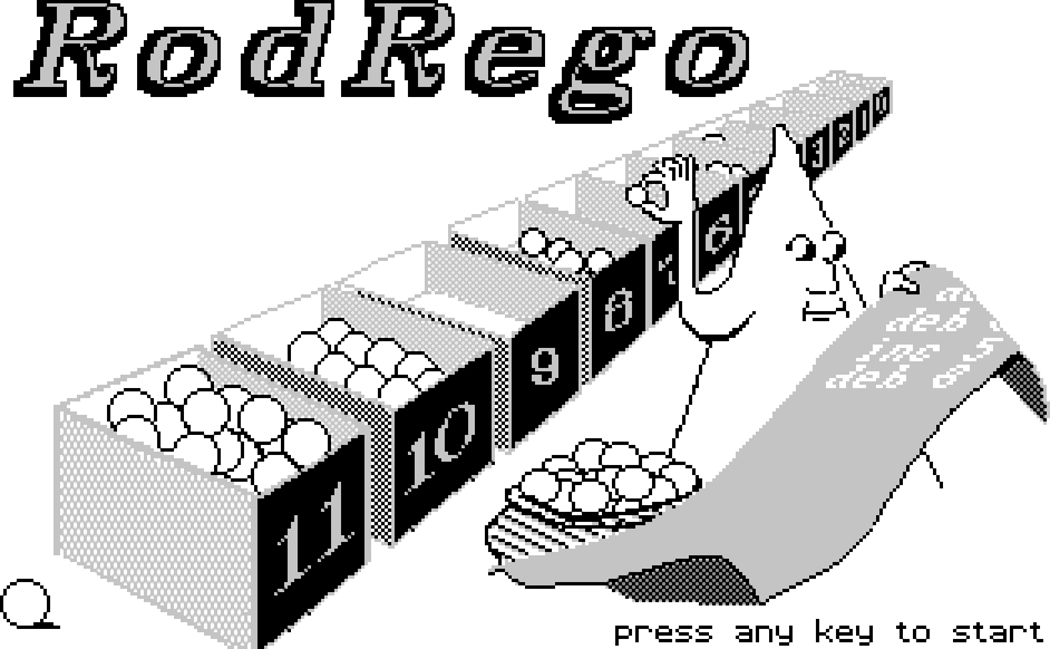
Home screen for the original RodRego register machine, 1986
There are both PC and Mac versions of RodRego available to run on your computer. We developed this thinking tool more than twenty years ago at the Curricular Software Studio, and hundreds of students and others have used it to become fluent register machine thinkers. You can type in your RAP programs and watch them run, with either beans or numbers in the registers. There are also animated PowerPoint demonstrations of the path taken by the processing unit through the flow graph for addition, for instance, so you can see exactly how RAP instructions correspond to the circles in the flow graph.
Now let’s turn to subtraction. Here is a first stab at a flow graph for subtracting the content of register 2 from the content of register 1, putting the answer in register 4. Can you see what is wrong with it?
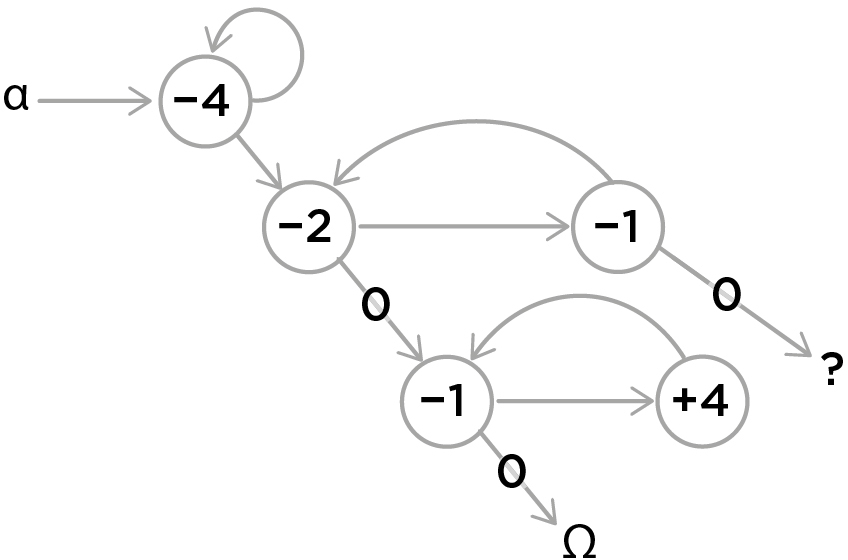
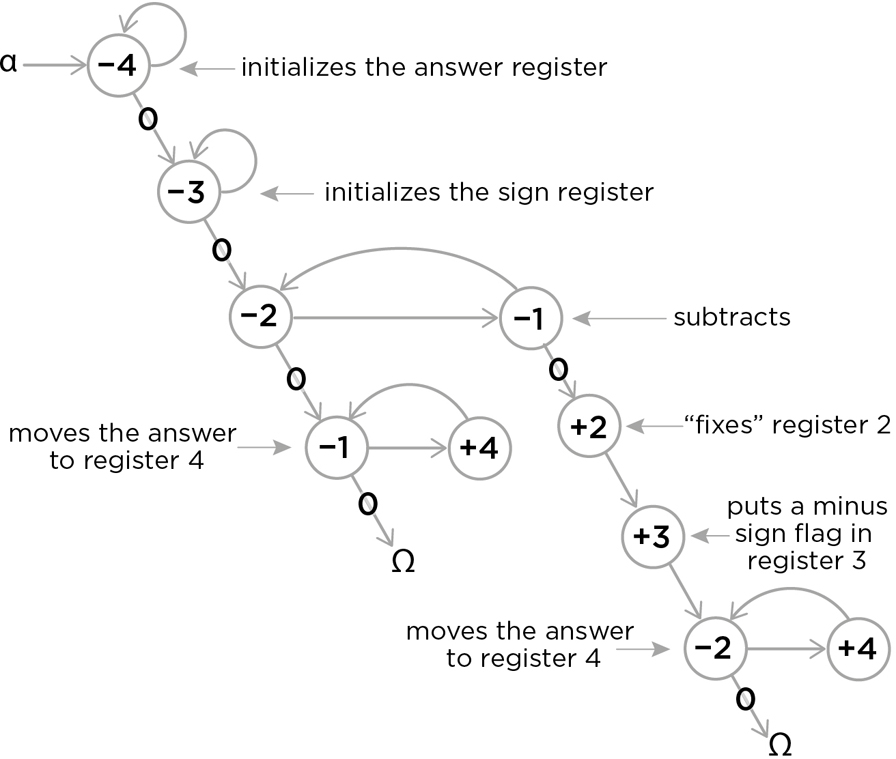
This will work only when the content of register 1 is greater than the content of register 2. But what if this isn’t so? Register 1 will “zero out” halfway through one pass in the subtraction loop, before it can finish the subtraction. What should happen then? We can’t just ask the computer to end, for this leaves the wrong answer (0) in register 4. We can use this zeroing out to start a new process, which first backs up half a loop and undoes the provisional decrementing from register 2. At this point the content of register 2 (not register 1) gives the right answer if we interpret it as a negative number, so you can simply move that content to register 4 (which is already zeroed out) and put a sign somewhere indicating that the answer is a negative number. The obvious thing to do is to reserve a register for just this task—let’s say, register 3. Zero it out at the beginning, along with register 4, and then have the program put a “flag” in register 3 as the sign of the answer, with 0 meaning + and 1 meaning –. Following is the flow graph, with comments explaining what each step or loop does. (You can put such comments in your RAP programs, in between # marks. They are for you and other human beings; RodRego will ignore them.)
Exercise 2
a. Write the RAP program for this flow graph. (Note that since the program branches, you can number the steps in several different ways. It doesn’t matter which way you choose as long as the “go to” commands point to the right steps.)
b. What happens when the program tries to subtract 3 from 3 or 4 from 4?
c. What possible error is prevented by zeroing out register 3 before trying the subtraction at step 3 instead of after step 4?
With addition and subtraction under our belts, multiplication and division are easily devised. Multiplying n times m is just adding n to zero m times. So we can instruct the computer to do just that, using one register as a counter, counting down from m to 0 by decrementing once each time the addition loop is completed.
Exercise 3
a. Draw a flow graph (and write the RAP program) for multiplying the content of register 1 by the content of register 3, putting the answer in register 5.
b. (Optional)[3] By copying and moving, improve the multiplier you created in problem a: when it stops, the original contents of register 1 and register 3 are restored, so that you can easily check the inputs and outputs for correctness after a run.
c. (Optional) Draw a flow graph and write a RAP program that examines the contents of register 1 and register 3 (without destroying them!) and writes the address (1 or 3) of the smaller content in register 2, and puts 2 in register 2 if the contents of registers 1 and 3 are equal. (After this program has executed, the contents of register 1 and register 3 should be unchanged, and register 2 should say if their contents are equal, and if not, which of those two registers has the smaller content.)
Division, similarly, can be done by subtracting the divisor over and over again from the dividend and counting up the number of times we can do that. We can leave the remainder, if any, in a special remainder register. But here we must be careful to add one crucial safety measure: we mustn’t divide by zero (must we?), so before any division starts, we should run a simple check on the divisor, by trying to decrement it. If we can decrement it, we should increment it just once (restoring it to its proper value) and then proceed with the division. If we hit zero, however, when we try to decrement it, we need to raise an alarm. We can do this by reserving a register for an ERROR flag: a 1 in register 5 can mean “TILT! I’ve just been asked to divide by zero!”
Here is the flow graph for dividing the content of register 1 by the content of register 2, putting the answer in register 3, the remainder in register 4, and highlighting register 5 for an “error message” (a 1 means “I was asked to divide by zero”).
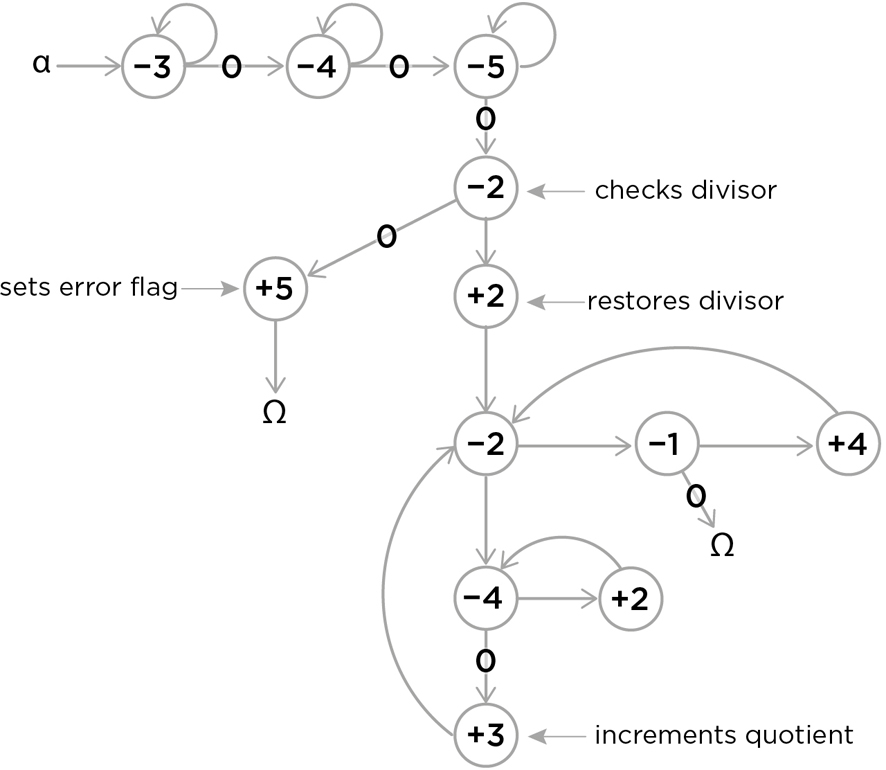
Walk through the flow graph, and notice how zero in the divisor aborts the operation and raises a flag. Notice, too, that register 4 is doing double duty, serving not only as a copy of the divisor, for restoring the divisor for each successive subtraction, but also as a potential remainder register. If register 1 zeros out before register 4 can dump its content back into register 2 for another subtraction, that content is the remainder, right where it belongs.
SECRET 1: Competence without Comprehension: Something—e.g., a register machine—can do perfect arithmetic without having to comprehend what it is doing.
The register machine isn’t a mind; it comprehends nothing; but it sorta comprehends three simple things—Inc, Deb, and End—in the sense that it slavishly executes these three “instructions” whenever they occur. They aren’t real instructions, of course; they are sorta instructions. They look like instructions to us, and the register machine executes them as if they were instructions, so it’s more than handy to call them instructions.
As you can now see, Deb, Decrement-or-Branch, is the key to the power of the register machine. It is the only instruction that allows the computer to “notice” (sorta notice) anything in the world and use what it notices to guide its next step. And in fact, this conditional branching is the key to the power of all stored-program computers, a fact that Ada Lovelace recognized back in the nineteenth century when she wrote her brilliant discussion of Charles Babbage’s Analytical Engine, the prototype of all computers.[4]
Assembling these programs out of their parts can become a rather routine exercise once we get the hang of it. In fact, once we have composed each of the arithmetic routines, we can use them again and again. Suppose we numbered them, so that ADD was operation 0 and SUBTRACT was operation 1, MULTIPLY was operation 2, and so forth. COPY could be operation 5, MOVE could be operation 6, and so on. Then we could use a register to store an instruction, by number.
Exercise 4 (Optional)
Draw a flow graph, and write a RAP program that turns a register machine into a simple pocket calculator, as follows:
a. Use register 2 for the operation:
0 = ADD
1 = SUBTRACT
2 = MULTIPLY
3 = DIVIDE
b. Put the values to be acted on in registers 1 and 3.
(Thus 306 would mean 3 + 6, and 513 would mean 5 – 3, and 425 would mean 4 × 5, and 933 would mean 9 ÷ 3). Then put the results of the operation in registers 4 through 7, using register 4 for the sign (using 0 for + and 1 for –) and register 5 for the numerical answer, register 6 for any remainder in a case of division, and register 7 as an alarm, signaling a mistake in the input (either divide-by-zero or an undefined operation in register 2).
Notice that in this example, we are using the contents of registers (in each case, a number) to stand for four very different things: a number, an arithmetical operation, the sign of a number, and an error flag.
SECRET 2: What a number in a register stands for depends on the program that we have composed.
Using the building blocks we have already created, we can construct more impressive operations. With enough patience we could draw the flow graph and write the program for SQUARING the number in register 7, or a program to FIND THE AVERAGE of the contents in registers 1 through 20, or FACTOR the content of register 6, putting a 1 in register 5 if 5 is a factor, or COMPARE the contents of register 3 and register 4 and put the larger content in register 5 unless it is exactly twice as large, in which case put a flag in register 7. And so forth.
A particularly useful routine would SEARCH through a hundred registers to see if any of them had a particular content, putting the number of that register’s address in register 101. (How would it work? Put the TARGET number in register 102, and a copy of the target in register 103; zero out register 101, then, starting at register 1, subtract its contents from the contents of 103 (after incrementing register 101), looking for a zero answer. If you don’t get it, go on to register 2, and so forth. If any register has the target number, halt; the address of that register will be in register 101.) Thanks to the basic “sensory” power embodied in Deb— its capacity to “notice” a zero when it tries to decrement a register—we can turn the register machine’s “eyes” in on itself, so it can examine its own registers, moving contents around and switching operations depending on what it finds where.
SECRET 3: Since a number in a register can stand for anything, this means that the register machine can, in principle, be designed to “notice” anything, to “discriminate” any pattern or feature that can be associated with a number—or a number of numbers.
For instance, a black-and-white picture —any black-and-white picture, including a picture of this page—can be represented by a large bank of registers, one register for each pixel, with 0 for a white spot and 1 for a black spot. Now, write the register machine program that can search through thousands of pictures looking for a picture of a straight black horizontal line on a white background. (Don’t actually try to do it. Life is short. Just imagine in some detail the difficult and hugely time-consuming process that would accomplish this.) Once you’ve designed—in your imagination—your horizontal-line-recognizer, and your vertical-line-recognizer, and your semi-circle-recognizer, think about how you might yoke these together with a few (dozen) other useful discriminators and make something that could discriminate a (capital) letter “A”—in hundreds of different fonts! This is one of the rather recent triumphs of computer programming, the Optical Character Recognition (OCR) software that can scan a printed page and turn it quite reliably into a computer text file (in which each alphabetic or numerical symbol is represented by a number, in ASCII code, so that text can be searched, and all the other wizardry of word-processing can be accomplished—by nothing but arithmetic). Can an OCR program read? Not really; it doesn’t understand what is put before it. It sorta reads, which is a wonderfully useful competence that can be added to our bountiful kit of moving parts.
SECRET 4: Since a number can stand for anything, a number can stand for an instruction or an address.
We can use a number in a register to stand for an instruction, such as ADD or SUBTRACT or MOVE or SEARCH, and to stand for addresses (registers in the computer), so we can store a whole sequence of instructions in a series of registers. If we then have a main program (program A) that instructs the machine to go from register to register doing whatever that register instructs it to do, then we can store a second program B in those registers. When we start the machine running program A, the first thing it does is to consult the registers that tell it to run program B, which it thereupon does. This means that we could store program A once and for all in the register machine’s central processing unit in a reserved set of registers (it could be “firmware” burnt into the ROM—read-only memory), and then use program A to run programs B, C, D, and so on, depending on what numbers we put in the regular registers. By installing program A in our register machine, we turn it into a stored-program computer.
Program A gives our register machine the competence to faithfully execute whatever instructions we put (by number) into its registers. Every possible program it can run consists of a series of numbers, in order, that program A will consult, in order, doing whatever each number specifies. And if we devise a system for putting these instructions in unambiguous form (for instance, requiring each instruction name to be the same length—say two digits), we can treat the whole series of numbers that compose the B program, say,
86, 92, 84, 29, 08, 50, 28, 54, 90, 28, 54, 90
as one great big long number:
869284290850285490285490
This number is both the unique “name” of the program, program B, and the program itself, which is executed, one step at a time, by program A. Another program is
28457029759028752907548927490275424850928428540423,
and another is
8908296472490284952498856743390438503882459802854544254789653985
but most interesting programs would have much, much longer names, millions of digits long. The programs you have stored on your laptop, such as a word processor and a browser, are just such long numbers, many millions of (binary) digits long. A program that is 10 megabytes in size is a string of eighty million 0s and 1s.
SECRET 5: All possible programs can be given a unique number as a name, which can then be treated as a list of instructions to be executed by a Universal machine.
Alan Turing was the brilliant theoretician and philosopher who worked this scheme out, using another simple imaginary computer, one that chugs back and forth along a paper tape divided into squares, making its behavior depend (aha!— conditional branching) on whether it reads a zero or a one on the square currently under its reading head. All the Turing machine can do is flip the bit (erasing 0, writing 1, or vice versa) or leave the bit alone, and then move left or right one tape square and go to its next instruction. I think you will agree that writing Turing machine programs to ADD and SUBTRACT and perform other functions, using just the binary numbers 0 and 1 instead of all the natural numbers (0, 1, 2, 3, 4, 5, etc.), and moving just one square at a time, is a more daunting exercise than our register machine exercises, but the point Turing made is exactly the same. A Universal Turing machine is a device with a program A (hardwired, if you like) that permits it to “read” its program B off its paper tape and then execute that program using whatever else is on the tape as data or input to program B. Hao Wang’s register machine can execute any program that can be reduced to arithmetic and conditional branching, and so can Turing’s Turing machine. Both machines have the wonderful power to take the number of any other program and execute it. Instead of building thousands of different computing machines, each hardwired to execute a particular complicated task, we build a single, general-purpose Universal machine (with program A installed), and then we can get it to do our bidding by feeding it programs—software—that create virtual machines.
The Universal Turing machine is a universal mimic, in other words. So is our less well-known Universal register machine. So is your laptop. There is nothing your laptop can do that the Universal register machine can’t do, and vice versa. But don’t hold your breath. Nobody said that all machines were equal in speed. We’ve already seen that our register machine is achingly slow at something as laborious as division, which it does by serial subtraction, for heaven’s sake! Are there no ways to speed things up? Indeed there are. In fact, the history of computers since Turing’s day is precisely the history of ever-faster ways of doing what the register machine does—and nothing else.
SECRET 6: All the improvements in computers since Turing invented his imaginary paper-tape machine are simply ways of making them faster.
For instance, John von Neumann created the architecture for the first serious working computer, and in order to speed it up, he widened the window or reading head of Turing’s machine from 1-bit-at-a-time to many-bits-at-a-time. Many early computers read 8-bit “words” or 16-bit “words” or even 12-bit words. Today 32-bit words are widely used. This is still a bottleneck—the von Neumann bottleneck—but it is thirty-two times wider than the Turing machine bottleneck! Simplifying somewhat, we can say that each word is COPIED from memory one at a time, into a special register (the Instruction Register), where it is READ and executed. A word typically has two parts, the Operation Code (e.g., ADD, MULTIPLY, MOVE, COMPARE, JUMP-IF-ZERO) and an Address, which tells the computer which register to go to for the contents to be operated on. So, 10101110 11101010101 might tell the computer to perform operation 10101110 on the contents of register 1110101010101, putting the answer, always, in a special register called the Accumulator. The big difference between the register machine and a Von Neumann machine is that the register machine can operate on any register (Inc and Deb only, of course), while a Von Neumann machine does all the arithmetic work in the Accumulator, and simply COPIES and MOVES (or STORES) contents to the registers that make up the memory. It pays for all this extra moving and copying by being able to perform many different fundamental operations, each hardwired. That is, there is a special electronic circuit for ADD and another for SUBTRACT and yet another for JUMP-IF-ZERO, and so forth. The Operation Code is rather like an area code in the telephone system or a zip code in the mail: it sends whatever it is working on to the right place for execution. This is how software meets hardware.
How many primitive operations are there in real computers these days? There can be hundreds, or thousands, or in a return to the good old days, a computer can be a RISC (Reduced Instruction Set Computer), which gets by with a few-dozen primitive operations but makes up for it in the blinding speed with which they are executed. (If Inc and Deb instructions could be carried out a million times faster than a hardwired ADD operation, it would pay to compose ADD by using Inc and Deb, as we did earlier, and for all additions with less than a million steps, we’d come out ahead.)
How many registers are there in real computers these days? Millions or even billions (but they’re each finite, so that really large numbers have to be spread out over large numbers of registers). A byte is 8 bits. If you have 64 megabytes of RAM (random access memory) on your computer, you have sixteen million 32-bit registers, or the equivalent. We saw that numbers in registers can stand for things other than positive integers. Real numbers (like or √2 or ⅓) are stored using a system of “floating point” representations, which breaks the number into two parts, the base and the exponent, as in scientific notation (“1.495 × 1041”), which permits computer arithmetic to handle (approximations of) numbers other than the natural numbers. Floating-point operations are just arithmetical operations (particularly multiplications and divisions) using these floating-point numbers as values, and the fastest super-computer you could buy twenty years ago (when I wrote the first version of this chapter) could perform over 4 MEGAFLOPS: over 4 million fl oating point o perations p er s econd.
If that isn’t fast enough for you, it helps to yoke together many such machines in parallel, so they are all working at the same time, not serially, waiting in a queue for results to work on. There is nothing that such a parallel machine can do that a purely serial machine cannot do, slower. In fact, most of the parallel machines that have been actively studied in the last twenty years have been virtual machines simulated on standard (nonparallel) Von Neumann machines. Special-purpose parallel hardware has been developed, and computer designers are busily exploring the costs and benefits of widening the von Neumann bottleneck, and speeding up the traffic through it, in all sorts of ways, with co-processors, cache memories, and various other approaches. Today, Japan’s Fujitsu K-computer can operate at 10.51 PETAFLOPS—which is over ten thousand trillion floating-point operations per second.
That might be almost fast enough to simulate the computational activity of your brain in real time. Your brain is a parallel processor par excellence, with something in the neighborhood of a hundred billion neurons, each quite a complicated little agent with an agenda. The optic “nerve,” carrying visual information from your eye to your brain, is, all by itself, several million channels (neurons) wide. But neurons operate much, much slower than computer circuits. A neuron can switch state and send a pulse (plausibly, its version of Inc or Deb) in a few milliseconds—thousandths, not millionths or billionths, of a second. Computers move bits around at near the speed of light, which is why making computers smaller is a key move in making them faster; it takes roughly a billionth of a second for light to travel a foot, so if you want to have two processes communicate faster than that, they have to be closer together than that.
SECRET 7: There are no more secrets!
Perhaps the most wonderful feature of computers is that because they are built up, by simple steps, out of parts (operations) that are also dead simple, there is simply no room for them to have any secrets up their sleeve. No ectoplasm, no “morphic resonances,” no invisible force fields, no hitherto unknown physical laws, no wonder tissue. You know that if you succeed in getting a computer program to model some phenomenon, there are no causes at work in the model other than the causes that are composed of all the arithmetical operations.
Now what about quantum computing, which is all the rage these days? Aren’t quantum computers capable of doing things that no ordinary computer can do? Yes and no. What they can do is solve many problems, compute many values simultaneously, thanks to “quantum superposition,” the strange and delicate property in which an unobserved entity can be in “all possible” states at once, until observation brings about “collapse of the wave packet.” (Consult your favorite popular physics book or website for more on this.) Basically, a quantum computer is just the latest—very impressive—innovation in speed, a quantum leap, one might say, in processing speed. A Turing machine chugging along on its paper tape, or a register machine running around incrementing and decrementing single registers, has a very strict limit on what it can do in practically small chunks of time—minutes or hours or days. A supercomputer like the Fujitsu K-computer can do all the same things trillions of times faster, but that is still not fast enough to solve some problems, especially in cryptography. That is where the speed bonus of quantum computers could pay off—if people can solve the ferociously difficult engineering problems encountered in trying to make a stable, practical quantum computer. It may not be possible, in which case we may have to settle for mere quadrillions of FLOPS.
[1] I am grateful to my colleague George Smith for introducing me to register machines, in an introductory course on computers we co-taught at Tufts in the mid-1980s. He recognized the tremendous pedagogical potential of register machines, and developed the expository structure I adapt here for a slightly different audience. The Curricular Software Studio that George and I founded at Tufts grew out of that course.
[2] Solutions to the problems in the exercises can be found in the appendix.
[3] This means the other exercises are compulsory! I mean it. If you want to take advantage of this thinking tool, you have to practice, practice, practice until you become fluent. Working through the simple compulsory exercises may take you an extra hour or two, but it’s worth it.
[4] Ada Lovelace, daughter of the poet Lord Byron, was an amazing mathematician and much else. In 1843 she published her translation of an Italian commentary on Babbage’s Analytical Engine, together with her own notes, which were longer and deeper than the piece she had translated: Menabrea (1842). Included in these notes was her carefully worked-out system for using Babbage’s Engine to compute Bernoulli numbers. For this she is often hailed as the first computer programmer.
When to use it
Understanding why humans are not born as blank slates and how innate biases guide learning.
Designing artificial intelligence systems that can learn from raw sensory data without pre-labeled inputs.
Analyzing the limits of the language of thought hypothesis in cognitive science.
Explaining the concept of competence without comprehension in evolutionary biology and robotics.
FROM THEORY TO EVERYDAY LIFE
In practice
The Robot Control Room Scenario
You wake up in a windowless room with lights and buttons, controlling a giant robot without labels. The brain faces the same predicament: interpreting sensory inputs without direct access to the world.
Bacterial Competence
Bacteria have remarkable competences (e.g., moving towards nutrients) without any understanding. This exemplifies competence without comprehension.
A MOMENT TO REFLECT
Put it to work.
How does the robot control room analogy change your understanding of perception and learning?
Can you think of a situation where you had to learn to interpret signals without explicit labels? How does that relate to the brain's predicament?
What does it mean to have 'competence without comprehension'? Can you identify examples in everyday life or in technology?
Often confused with
References
- The Language of Thought — Jerry Fodor (1975)
- The Language of Thought Revisited — Jerry Fodor (2008)
- The Blank Slate: The Modern Denial of Human Nature — Steven Pinker (2002)
- Sorry, But Your Soul Just Died — Tom Wolfe (2000)
- A Variant to Turing's Theory of Computing Machines — Hao Wang (1957)
- Sketch of the Analytical Engine Invented by Charles Babbage — L. F. Menabrea (translated with notes by Ada Lovelace) (1842)
CONTINUE THE CONVERSATION
Source texts
- Intuition Pumps and Other Tools for Thinking