Investigate the Source
Before judging an online claim, find out who published it and whether they are in a position to know. A profile check or a search for independent information about the source can give you a useful starting point.
THE IDEA
Investigate the Source
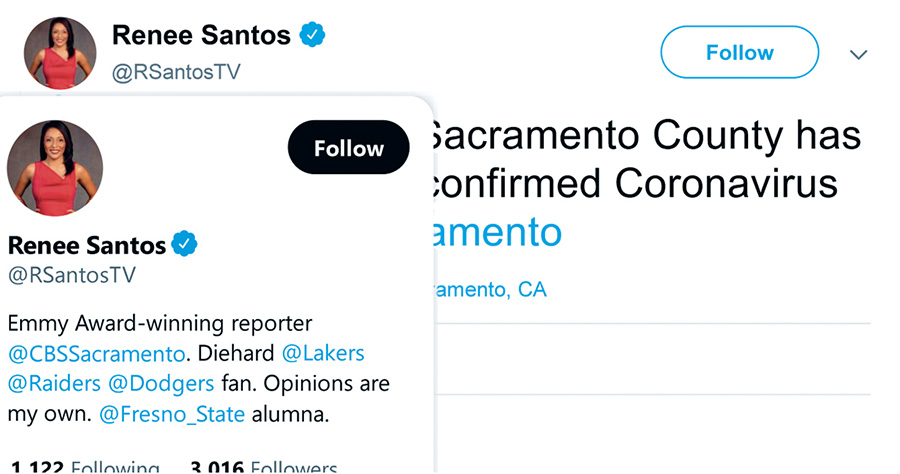
Sometimes a source check can be as simple as hovering over a profile. Really. It can be that simple. Take this example from February 2020, where a person states that the first COVID-19 case in Sacramento, California, has been discovered.
We note that the account has a blue checkmark, but checkmarks do not mean that the person is reliable. Who is she, exactly? In this example, we “hover,” putting the mouse over her photo until her brief Twitter bio pops up.11
When we do that, we find two things we like to see in sources. First, Renee Santos is in a particular “position to know” here: this is a claim about a COVID-19 case in Sacramento, and Santos is a local Sacramento reporter. Second, her position, reporter, puts her in a class of people that have reputational incentives to get things right. That doesn’t mean she’s always right. But she’s likely to be more careful with the truth than your average opinion columnist or political activist, because getting things wrong in her profession has more significant professional repercussions.
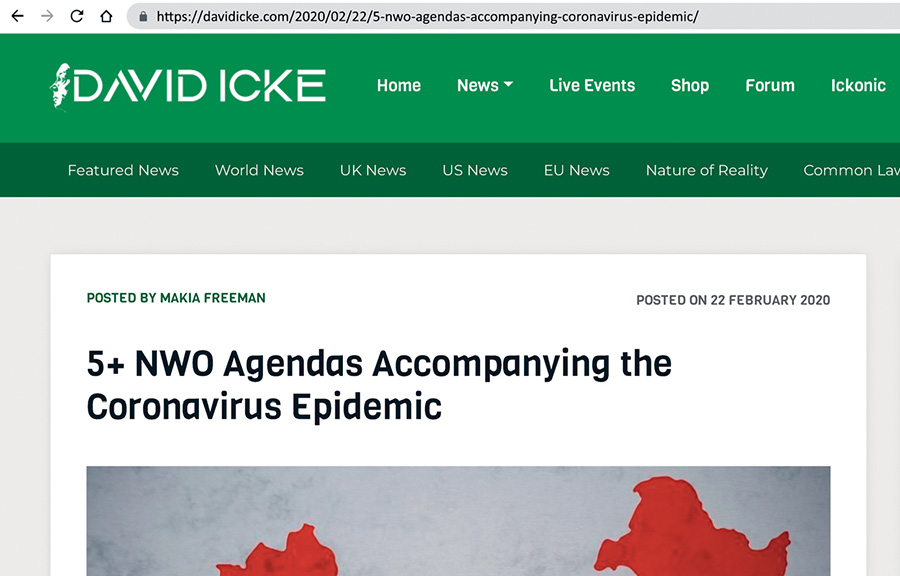
Compare Renee Santos’s tweet to this next example, again, from February 2020. It’s an article about how various government reactions to the pandemic were supposedly power grabs by the “New World Order,” an underground government with plans to take over the world.
Maybe there is a grain of truth to this, maybe not. Just looking at it, it’s hard to say, at least at first. It’s certainly the case that history provides examples of some groups using crises to take power, and we’d be foolish to think such actions are impossible.
Whether the subject is “antifa” or pandemic policy, plausibility shouldn’t be our first question. Our first question is always, Do we know what we’re looking at? Let’s take a look.
A profile can provide a quick clue about a reporter. For an unfamiliar organisation or publication, try a search that adds Wikipedia to its name. We call this “Just Add Wikipedia.”
Yes, we know, you’re probably wondering why a book on finding truth on the internet is bringing up Wikipedia at all. Isn’t Wikipedia bad?
In a word, no. Wikipedia can provide a useful starting point for learning about an organisation or publication, especially when you follow its citations. It is a frequent first stop for fact-checkers.12
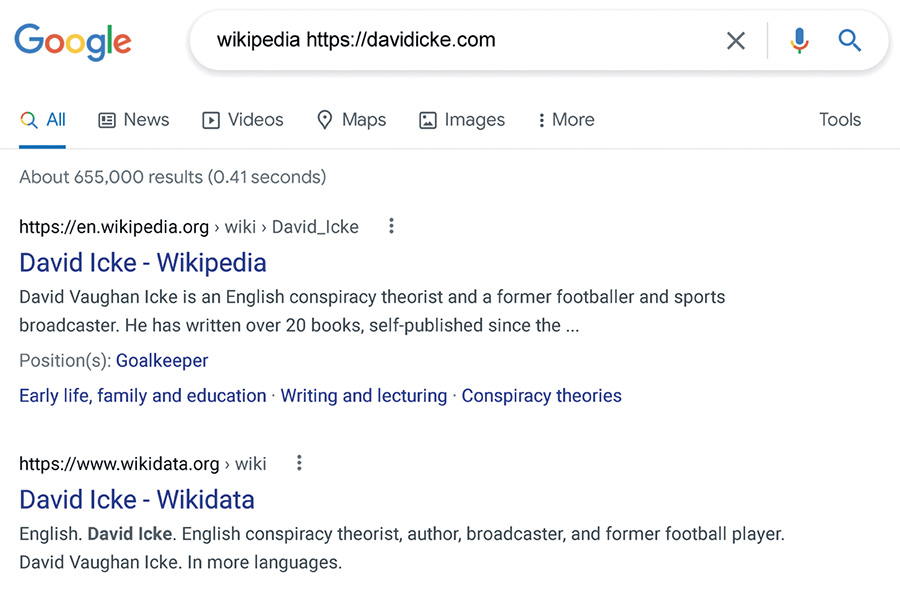
Here is how that search works for a source check.
Back to our “NWO agendas” article. It’s on a site run by David Icke called DavidIcke.com. We’re going to put that domain (davidicke.com) into a search engine, along with the term “Wikipedia” and hit enter. There’s nothing magic about this search, by the way. It’s just a quick way to find a relevant Wikipedia article. And, in this case, it works, floating an article on Icke to the top of the results.
Even before we click into the article, we sense trouble. Do you see the brief description pulled from Wikipedia? It reads, “David Vaughan Icke is an English conspiracy theorist and former footballer.”
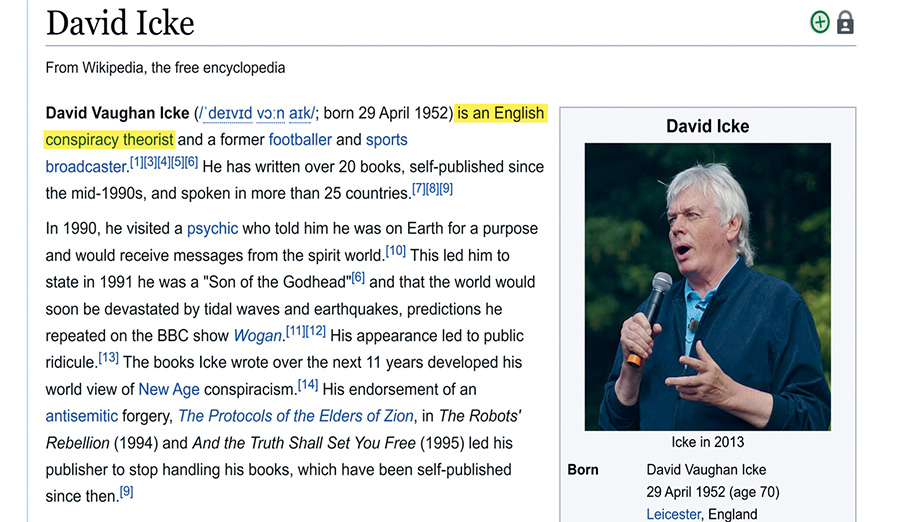
So, OK, a conspiracy theorist. How bad can it be? Let’s click in and find out.
Note that the claim that Icke is a conspiracy theorist is not made lightly. There are no less than five footnotes supporting it. In fact, his only other real claims to fame seem to be as a soccer player and sportscaster.
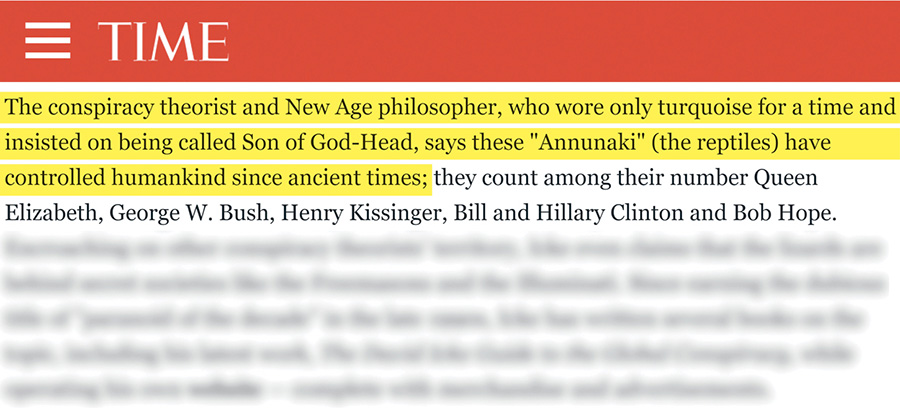
Now, if you still are worried that this charge is being thrown around lightly, you can click through Wikipedia’s footnotes and take a look. Let’s look behind footnote 3.
Um . . . yeah. We’re as open minded as the rest, but we prefer to get our health policy analysis from the set of people who don’t think the world is ruled by a secret race of lizard overlords.
When to use it
Evaluating a news story shared by an unfamiliar account on Twitter or Facebook.
Quickly assessing the credibility of a website or blog before reading its content.
Teaching students or colleagues a simple, effective method for source verification.
FROM THEORY TO EVERYDAY LIFE
In practice
Hovering over a Twitter profile to verify a reporter
In February 2020, a tweet claimed the first COVID-19 case in Sacramento. By hovering over the profile, the user identified Renee Santos as a local Sacramento reporter—someone with a position to know and reputational incentives to be accurate.
Using 'Just Add Wikipedia' to check a conspiracy site
An article from DavidIcke.com claimed government pandemic responses were a 'New World Order' power grab. Searching 'davidicke.com Wikipedia' revealed that David Icke is an English conspiracy theorist, raising immediate red flags about the source's reliability.
A MOMENT TO REFLECT
Put it to work.
When you encounter a surprising claim on social media, what's the first thing you can do to check the source without reading the full article?
How does knowing an author's background (e.g., reporter vs. conspiracy theorist) change how you evaluate their claims?
Why is Wikipedia often a good first stop for quickly learning about an organization or publication?
CONTINUE THE CONVERSATION
Source texts
- Verified How to Think Straight, Get Duped Less, and Make Better Decisions about What to Believe Online (Mike Caulfield, Sam Wineburg)