Google's Three Vertical Dots Are a Great Hack for Lateral Reading
The source illustrates lateral reading with Google’s search-result information menu: use outside information to investigate who runs a site and how others describe it. The screenshots show the interface at publication, so the specific controls and ratings are historical examples.
THE IDEA
GOING DEEPER
Google’s Three Vertical Dots Are a Great Hack for Lateral Reading
In 2021, Google rolled out three vertical dots, a feature for investigating search results through lateral reading, discussed in chapter 4. In the interface pictured here, three dots appear beside a result. (Someone in one of our workshops christened them the “Little Snowman.”) When you click on them, the menu provides background information. In the example about fracking, we asserted (without, we should note, providing a shred of evidence) that the Ballotpedia site was a “helpful” and “reliable” resource. Use Google’s three dots to do a quick fact-check on us!
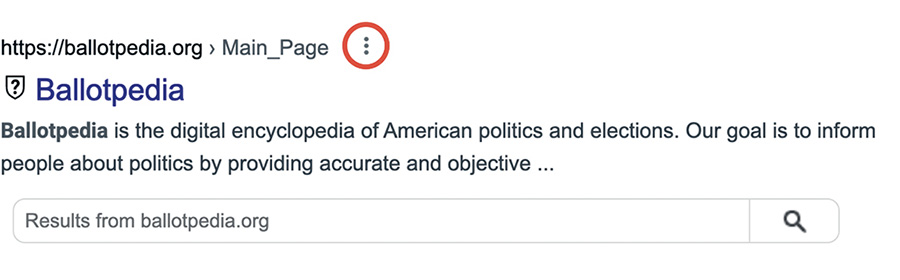
Figure 3.14 Google’s three dots on the results for Ballotpedia. (Google and the Google logo are trademarks of Google LLC.)
When you press on the three dots, the pictured menu offers a shortcut to outside information about the site.
In this example, the menu links to a Wikipedia entry. But that’s just the beginning. If you press on “More about this page,” you’re given links that provide more information about the site. For Ballotpedia, one of links is from AllSides (allsides.com), a group that rates websites on a scale for political bias. The screenshot’s example gives Ballotpedia a “center” rating. That describes AllSides’ assessment of political leaning, not a guarantee of factual accuracy.
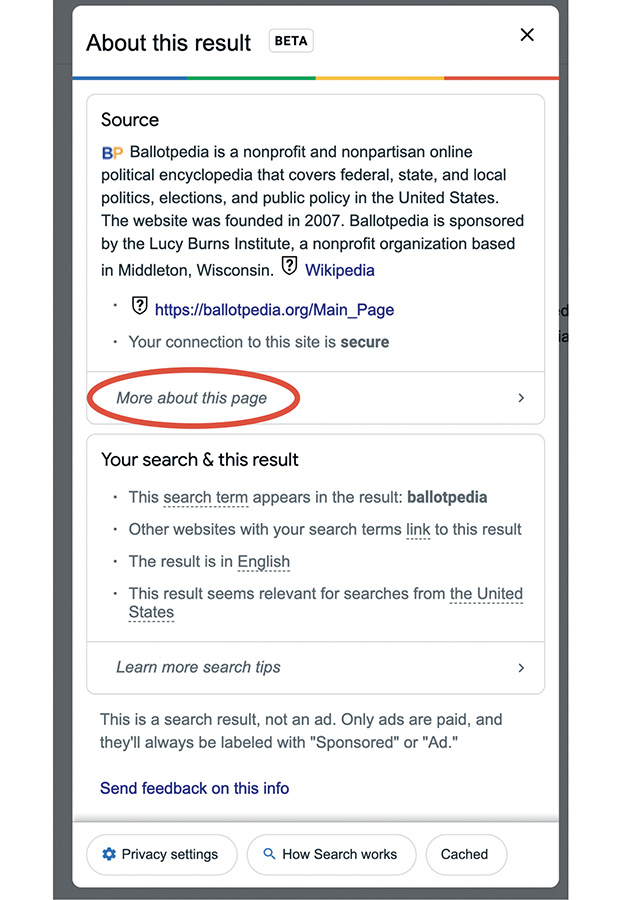
Figure 3.15 “More about this page” under the three dots. (Google and the Google logo are trademarks of Google LLC.)
When to use it
Verifying the credibility of a news article found via search.
Checking the bias of a political source before sharing.
Quickly learning about the organization behind a website.
Using Google's feature as a shortcut for lateral reading in research.
FROM THEORY TO EVERYDAY LIFE
In practice
Ballotpedia Fact-Check
The source’s Ballotpedia example uses the search-result menu to find a Wikipedia entry and an AllSides political-bias rating. These provide starting points for investigating the site; the rating alone does not verify a particular claim.
Checking a News Site
When evaluating a news site, look for independent information about its ownership, expertise, corrections, and reputation. A search-result information menu may provide a shortcut, but the underlying task is to consult sources beyond the site itself.
A MOMENT TO REFLECT
Put it to work.
How can you use the three dots hack the next time you read a search result?
What other tools beyond Google can you use for lateral reading?
When have you relied on a search result without fact-checking it?
CONTINUE THE CONVERSATION
Source texts
- Verified How to Think Straight, Get Duped Less, and Make Better Decisions about What to Believe Online (Mike Caulfield, Sam Wineburg)